DCA Calculator — Guide
The DCA calculator helps you verify that your trading limit is correctly sized for your total exchange balance. Use it to confirm, before you deploy, that every buydown stage across all of your pairs can be funded without exceeding the wallet you have available.
What The Calculator Does
A quick orientation before you open the spreadsheet and start entering values.
The calculator is a simple worksheet that models the total capital required to run your Broxynet-V1 DCA strategy across one pair — or many pairs sharing the same DU and trading-limit settings.
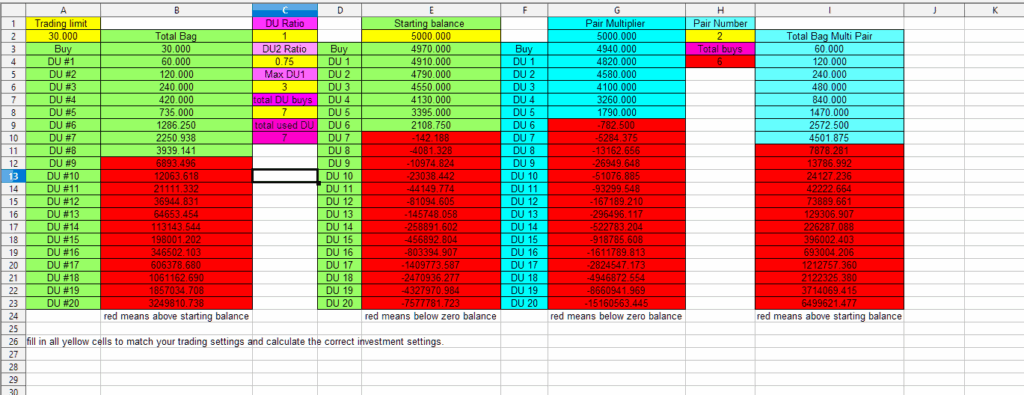
You enter four values: your trading limit, your DU stage ratios, your starting wallet balance, and the number of pairs you plan to run. From those inputs, the sheet produces two independent result sets — one for a single pair, another for all pairs combined.
Critical rule: any cell highlighted in red indicates that the required capital exceeds your available trading wallet balance. If you see red cells, adjust your settings (lower limit, fewer DU stages, or fewer pairs) until every figure fits within your balance before deploying to a live account.
Entering Your Values
Four inputs, in this exact order. The cell references below match the layout of bncalculator.ods.
Set Your Trading Limit
Cell A2The amount you intend to deploy per pair trade. For example, enter 50 if you plan to invest $50 on every pair.
Enter Your DU Settings
Column CThe four DU values from your broxynet-v1 setup: the DU ratio (C2), the Du2 ratio (C4), the max du1 buys setting (C6), and the total combined DU buys — du1 + du2 — in C8.
Add Your Starting Balance
Cell E2Your initial exchange wallet balance. For example, enter 1000 if you have $1,000 available to trade with.
Set Your Pair Count
Cell H2The total number of pairs you intend to run simultaneously with the settings above. This drives the multi-pair result set.
What The Sheet Looks Like
A quick visual of the calculator layout so you can match each input to its cell.
Reading The Two Result Sets
Once your inputs are in place, the sheet produces two independent calculations. Read both before you deploy.
The Green Set
This column models one pair running with your trading limit and DU settings. Use it to sanity-check that a single position — across all its buydown stages — stays inside your wallet balance.
The Red Set
This column multiplies the single-pair figures by your total pair count (cell H2). It represents what it would actually cost to run every pair at once with identical settings.
Red-highlighted cells are your stop signal. Any figure shown in red has been calculated to exceed the wallet balance you entered in E2. If any of these appear, reduce your trading limit, lower your DU stage count, or drop the pair count until every cell sits within your available balance — then re-run the calculation before going live.
Download The Calculator
The spreadsheet opens in any modern office suite (LibreOffice, Google Sheets, Microsoft Excel).
The standalone DCA calculator for broxynet-V1 — enter your four values, read the results, and confirm your balance can cover every stage.
Please Read Before Use
This tool is provided “as is” for testing and development purposes only. No liability is assumed by the developer for any resulting losses or damages. The use of this calculator — and any strategy informed by it — is entirely at your own risk. Always validate figures against your live wallet balance before deploying to a real account.